Table of contents
Open Table of contents
Introduction
Purpose
In this post you’ll learn five ways to get secrets into a deployed app with GitLab CI/CD and OpenBao (an open-source fork of HashiCorp Vault). They range from plain .env files, through JWT and AppRole authentication, to a Vault Agent running on the host and live fetches from the app’s own SDK. Along the way we’ll stand up the entire self-hosted GitLab and OpenBao environment from scratch.
Prerequisites
- Somewhere to deploy the environment - a cloud provider or on-prem hardware. I went with Microsoft Azure.
- Docker, plus a little development experience.
- The Azure CLI (
az),git, and the OpenBao CLI (bao) installed locally.
Tooling
A quick tour of the three pillars this lab rests on.
Secret Management
OpenBao is an open-source fork of HashiCorp Vault, maintained under the Linux Foundation and API-compatible with Vault (the CLI is bao instead of vault). It keeps secrets encrypted at rest and hands them out only to identities that authenticate and are authorized by policy. We lean on three of its features:
- KV v2 secrets engine, mounted at
secret/, where each app keeps aprodentry atsecret/<app>/prod. - Authentication methods - JWT/OIDC (trust GitLab as an identity provider so a CI job logs in with a short-lived token instead of a stored credential) and AppRole (a
role_id+secret_idpair for workloads running on the prod host). - Policies - each login gets a read-only policy scoped to that one app’s path (
secret/data/<app>/prod), never the whole tree. Tokens are short-lived (15–60 min), so a leaked one is worthless tomorrow.
Version Control
Self-hosted GitLab (the gitlab-ee image) gives us three things at once: Git hosting, a CI/CD engine driven by .gitlab-ci.yml, and - crucially for the Vault scenarios - an OIDC provider. GitLab publishes a JWKS endpoint at /oauth/discovery/keys and can mint a per-job ID token (id_tokens) that OpenBao verifies. That is what lets a pipeline prove “I am this job, in this project” to Vault without any shared secret.
DevOps & DevSecOps Practices
The whole environment is reproducible: one script provisions the VMs, cloud-init installs Docker, and every deploy goes through a pipeline. The DevSecOps thread running through the five scenarios is a steady tightening of where secrets live and for how long:
- keep secrets out of source control,
- then out of CI configuration,
- grant least privilege (read-only, single path),
- prefer short-lived, auto-rotated credentials over static ones,
- and render secrets to memory (tmpfs), never to disk.
Each scenario moves one notch further along that line.
Setup
We’ll provision the infrastructure on Azure, get onto the private network, then stand up GitLab, the runner, OpenBao, and the prod host - in that order - so each piece is ready before the one that depends on it.
Architecture
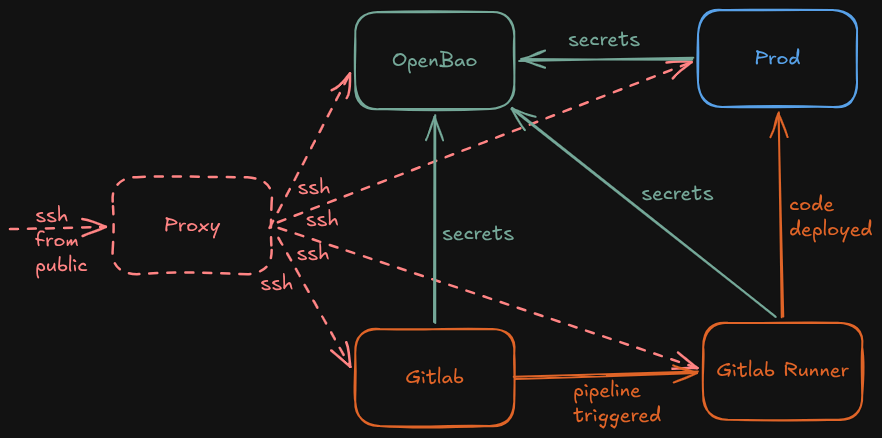
The lab is made up of five Ubuntu machines:
- Proxy
- Gitlab
- Gitlab Runner
- OpenBao
- Prod
Azure
The whole lab runs in one resource group on a single VNet (10.10.0.0/16) with one subnet (10.10.1.0/24). Only the proxy is reachable from the internet: it gets a public IP and a network security group that allows inbound SSH. Every other machine sits on the private subnet with no public IP and is reached by jumping through the proxy. The four internal hosts get Docker installed automatically via cloud-init; the proxy stays a plain jump host.
| Host | Private IP | Public IP | Role |
|---|---|---|---|
proxy | 10.10.1.4 | ✅ | SSH jump host |
gitlab | 10.10.1.5 | - | GitLab server |
gitlab-runner | 10.10.1.6 | - | CI/CD runner |
prod | 10.10.1.7 | - | Deployment target |
secman | 10.10.1.8 | - | OpenBao (Vault) |
Azure reserves the first four addresses of every subnet, so the first usable IP is
.4. The script creates the VMs in order, so they land on.4–.8predictably.
The provisioning script - one VNet, an SSH-only NSG on the proxy, and cloud-init to install Docker on the internal hosts:
#!/usr/bin/env bash
set -euo pipefail

# ── Config ──────────────────────────────────────────────────────────────────
RG="RG-Test"
LOC="westeurope"
VNET="test-vnet"
SUBNET="test-subnet"
SUBNET_PREFIX="10.10.1.0/24"
VNET_PREFIX="10.10.0.0/16"
NSG_PROXY="proxy-nsg"
ADMIN_USER="elnur"
SSH_KEY="${HOME}/.ssh/id_rsa.pub"          # use id_ed25519.pub if that's your key
IMAGE="Ubuntu2404"                          # Canonical 24.04 LTS

SIZE_PROXY="Standard_B2s"                   # 2 vCPU / 4 GiB - jump host
SIZE_MAIN="Standard_F4s_v2"                 # 4 vCPU / 8 GiB - runner, prod, secman
SIZE_GITLAB="Standard_D4as_v5"              # GitLab needs more headroom

INTERNAL_VMS=(gitlab-runner prod secman)

# ── Cloud-init: install Docker on every internal host ────────────────────────
CLOUD_INIT=$(mktemp)
cat > "$CLOUD_INIT" <<EOF
#cloud-config
package_update: true
runcmd:
  - curl -fsSL https://get.docker.com | sh
  - usermod -aG docker ${ADMIN_USER}
  - systemctl enable --now docker
EOF

# ── Network: one VNet, one subnet ────────────────────────────────────────────
az network vnet create \
  -g "$RG" -l "$LOC" -n "$VNET" \
  --address-prefix "$VNET_PREFIX" \
  --subnet-name "$SUBNET" \
  --subnet-prefix "$SUBNET_PREFIX"

# NSG for the proxy only: allow SSH from the internet
az network nsg create -g "$RG" -l "$LOC" -n "$NSG_PROXY"
az network nsg rule create \
  -g "$RG" --nsg-name "$NSG_PROXY" -n allow-ssh \
  --priority 1000 --direction Inbound --access Allow \
  --protocol Tcp --destination-port-ranges 22

# ── Proxy: public jump host ──────────────────────────────────────────────────
az vm create \
  -g "$RG" -l "$LOC" -n proxy \
  --image "$IMAGE" --size "$SIZE_PROXY" \
  --vnet-name "$VNET" --subnet "$SUBNET" \
  --nsg "$NSG_PROXY" \
  --public-ip-sku Standard \
  --admin-username "$ADMIN_USER" \
  --ssh-key-values "$SSH_KEY"

# ── GitLab: internal only, larger size ───────────────────────────────────────
az vm create \
  -g "$RG" -l "$LOC" -n gitlab \
  --image "$IMAGE" --size "$SIZE_GITLAB" \
  --vnet-name "$VNET" --subnet "$SUBNET" \
  --nsg "" \
  --public-ip-address "" \
  --admin-username "$ADMIN_USER" \
  --ssh-key-values "$SSH_KEY" \
  --custom-data "$CLOUD_INIT" \
  --no-wait

# ── Internal hosts: no public IP, reached through the proxy ──────────────────
for vm in "${INTERNAL_VMS[@]}"; do
  az vm create \
    -g "$RG" -l "$LOC" -n "$vm" \
    --image "$IMAGE" --size "$SIZE_MAIN" \
    --vnet-name "$VNET" --subnet "$SUBNET" \
    --nsg "" \
    --public-ip-address "" \
    --admin-username "$ADMIN_USER" \
    --ssh-key-values "$SSH_KEY" \
    --custom-data "$CLOUD_INIT" \
    --no-wait
done

az vm wait --created --ids $(az vm list -g "$RG" --query "[].id" -o tsv)
rm -f "$CLOUD_INIT"

# ── Summary + ready-to-paste SSH config ──────────────────────────────────────
PROXY_IP=$(az vm show -d -g "$RG" -n proxy --query publicIps -o tsv)
echo
echo "Proxy public IP: $PROXY_IP"
echo "Private IPs:"
az vm list -g "$RG" -d --query "[].{name:name, ip:privateIps}" -o table

echo
echo "~/.ssh/config:"
echo "Host proxy"
echo "    HostName ${PROXY_IP}"
echo "    User ${ADMIN_USER}"
echo
for vm in gitlab gitlab-runner prod secman; do
  ip=$(az vm show -d -g "$RG" -n "$vm" --query privateIps -o tsv)
  echo "Host ${vm}"
  echo "    HostName ${ip}"
  echo "    User ${ADMIN_USER}"
  echo "    ProxyJump proxy"
  echo
done
Run it once you’re logged in (az login) and the resource group exists:
chmod +x azure_env_setup.sh
./azure_env_setup.sh
When it finishes it prints the proxy’s public IP, every private IP, and a ready-to-paste SSH config so you can ssh gitlab, ssh prod, etc. straight through the jump host:
Host proxy
    HostName <proxy-public-ip>
    User elnur

Host gitlab
    HostName 10.10.1.5
    User elnur
    ProxyJump proxy
# ... one block per internal host
Access from your machine
Two small things on your laptop. First, route the private subnet through the proxy with sshuttle so you can reach the web UIs and APIs directly:
sshuttle -r proxy 10.10.1.0/24Then map the hostnames the rest of the setup relies on in /etc/hosts:
10.10.1.5    gitlab.elnurbda.com
10.10.1.8    vault.elnurbda.com
On each internal node, add the full set so the hosts and containers can resolve one another:
10.10.1.4  proxy
10.10.1.5  gitlab gitlab.elnurbda.com
10.10.1.6  gitlab-runner
10.10.1.7  prod
10.10.1.8  secman vault.elnurbda.com
Gitlab Setup
On the gitlab host, drop a Compose file at /srv/docker-compose.yml:
services:
  gitlab:
    image: gitlab/gitlab-ee:latest
    container_name: gitlab
    restart: always
    hostname: "gitlab.elnurbda.com"
    environment:
      GITLAB_OMNIBUS_CONFIG: |
        external_url 'https://gitlab.elnurbda.com'
        gitlab_rails['gitlab_shell_ssh_port'] = 2222
        letsencrypt['enable'] = false
        nginx['redirect_http_to_https'] = true
    ports:
      - "80:80"
      - "443:443"
      - "2222:22"
    volumes:
      - "/srv/gitlab/config:/etc/gitlab"
      - "/srv/gitlab/logs:/var/log/gitlab"
      - "/srv/gitlab/data:/var/opt/gitlab"
    shm_size: "256m"
SSH is remapped to 2222 so it doesn’t clash with the host’s own sshd. TLS is on but Let’s Encrypt is off - GitLab generates a self-signed certificate, which matters later: both OpenBao and the runner have to trust it.
Bring it up and grab the first-login password:
docker compose up -d
# give GitLab a couple of minutes to finish booting
docker compose exec gitlab cat /etc/gitlab/initial_root_password
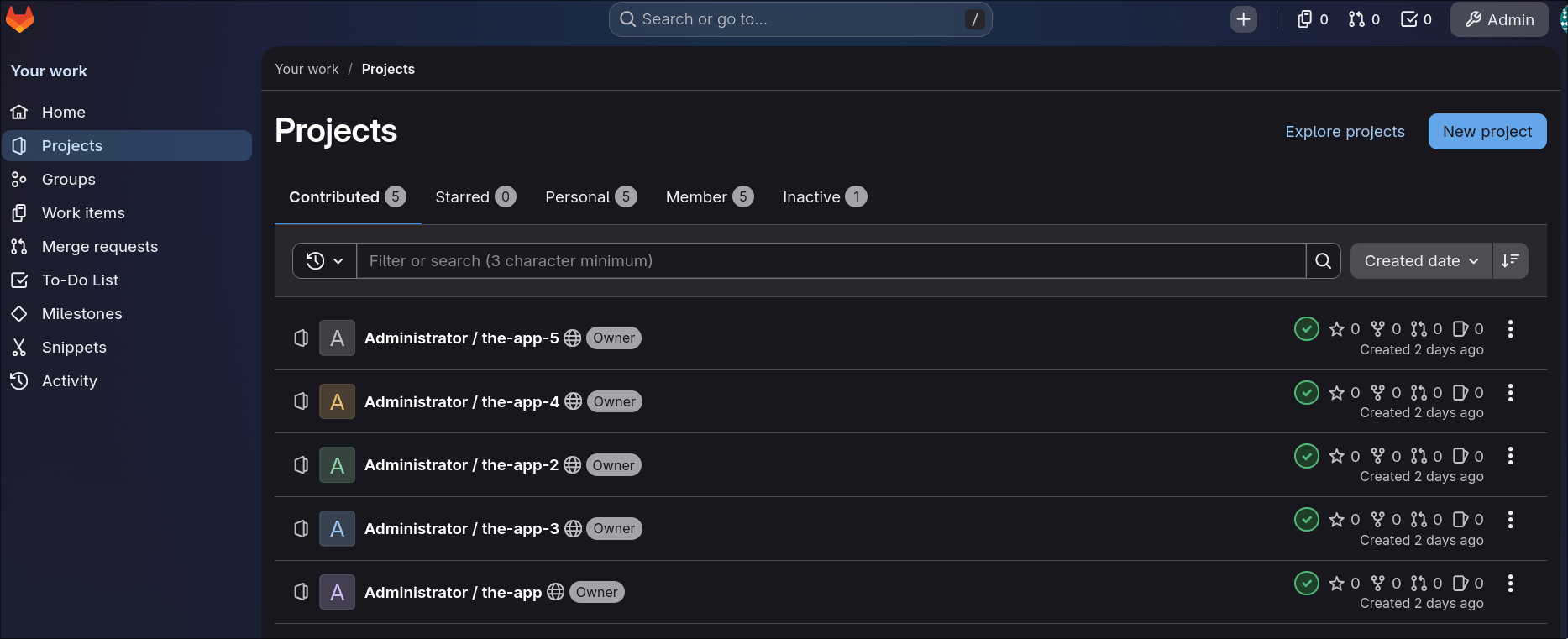
Log in at https://gitlab.elnurbda.com as root, then create a project for each app we’ll deploy.
Gitlab Runner Setup
The runner executes pipeline jobs. On the gitlab-runner host, run it as a container:
# /srv/docker-compose.yml
services:
  runner:
    image: gitlab/gitlab-runner:latest
    container_name: gitlab-runner
    restart: always
    volumes:
      - /srv/gitlab-runner/config:/etc/gitlab-runner
      - /var/run/docker.sock:/var/run/docker.sock
Because GitLab serves a self-signed certificate, extract its CA into the runner’s cert directory (the same trick OpenBao needs) so the runner trusts the API when it registers and when jobs clone over HTTPS:
openssl s_client -connect gitlab.elnurbda.com:443 -showcerts </dev/null 2>/dev/null \
  | openssl x509 -outform PEM > /srv/gitlab-runner/config/certs/gitlab.pem
That host path maps to /etc/gitlab-runner/certs/gitlab.pem inside the container — which is what --tls-ca-file points at below. Grab a registration token from Admin → CI/CD → Runners → New instance runner, then register with the Docker executor:
docker compose exec runner gitlab-runner register \
  --non-interactive \
  --url "https://gitlab.elnurbda.com" \
  --token "<runner-token>" \
  --executor "docker" \
  --docker-image "docker:24" \
  --docker-privileged \
  --tls-ca-file /etc/gitlab-runner/certs/gitlab.pem
The jobs in this post build images and ssh into prod, so the runner also needs Docker (hence the mounted socket) and the deploy SSH key - provided per project as a CI variable.
OpenBao Setup
On the secman host. Because OpenBao validates JWTs signed by GitLab’s self-signed certificate, first extract that certificate:
openssl s_client -connect gitlab.elnurbda.com:443 -showcerts </dev/null 2>/dev/null \
  | openssl x509 -outform PEM > /srv/gitlab.pem
/srv/docker-compose.yml (based on openbao-docker-compose):
services:
  openbao:
    image: openbao/openbao:2.3.1
    command: ["server", "-config=/openbao/config/bao.conf"]
    cap_add: [IPC_LOCK] # lets OpenBao mlock memory (keeps secrets out of swap)
    ports:
      - "0.0.0.0:8200:8200"
      - "0.0.0.0:8201:8201"
    environment:
      - VAULT_ADDR=http://vault.elnurbda.com:8200
    volumes:
      - ./config:/openbao/config
      - ./data/openbao_file:/openbao/file
      - ./gitlab.pem:/openbao/config/gitlab.pem # GitLab CA for JWKS validation
    extra_hosts:
      - "gitlab.elnurbda.com:10.10.1.5" # containers don't read the host /etc/hosts
- "vault.elnurbda.com:10.10.1.8"/srv/config/bao.conf:
storage "raft" {
  path    = "/openbao/file"
  node_id = "node1"
}

listener "tcp" {
  address     = "0.0.0.0:8200"
  tls_disable = true
}

cluster_addr = "http://vault.elnurbda.com:8201"
api_addr     = "http://vault.elnurbda.com:8200"
ui           = true

default_lease_ttl = "168h"
max_lease_ttl     = "720h"
Bring it up, then initialise and unseal:
docker compose up -d
docker compose exec openbao bao operator init      # save the 5 unseal keys + root token!
docker compose exec openbao bao operator unseal    # run 3× with 3 different keys
TLS is disabled on the listener because everything stays inside the private VNet. In a real deployment, terminate TLS in front of OpenBao.
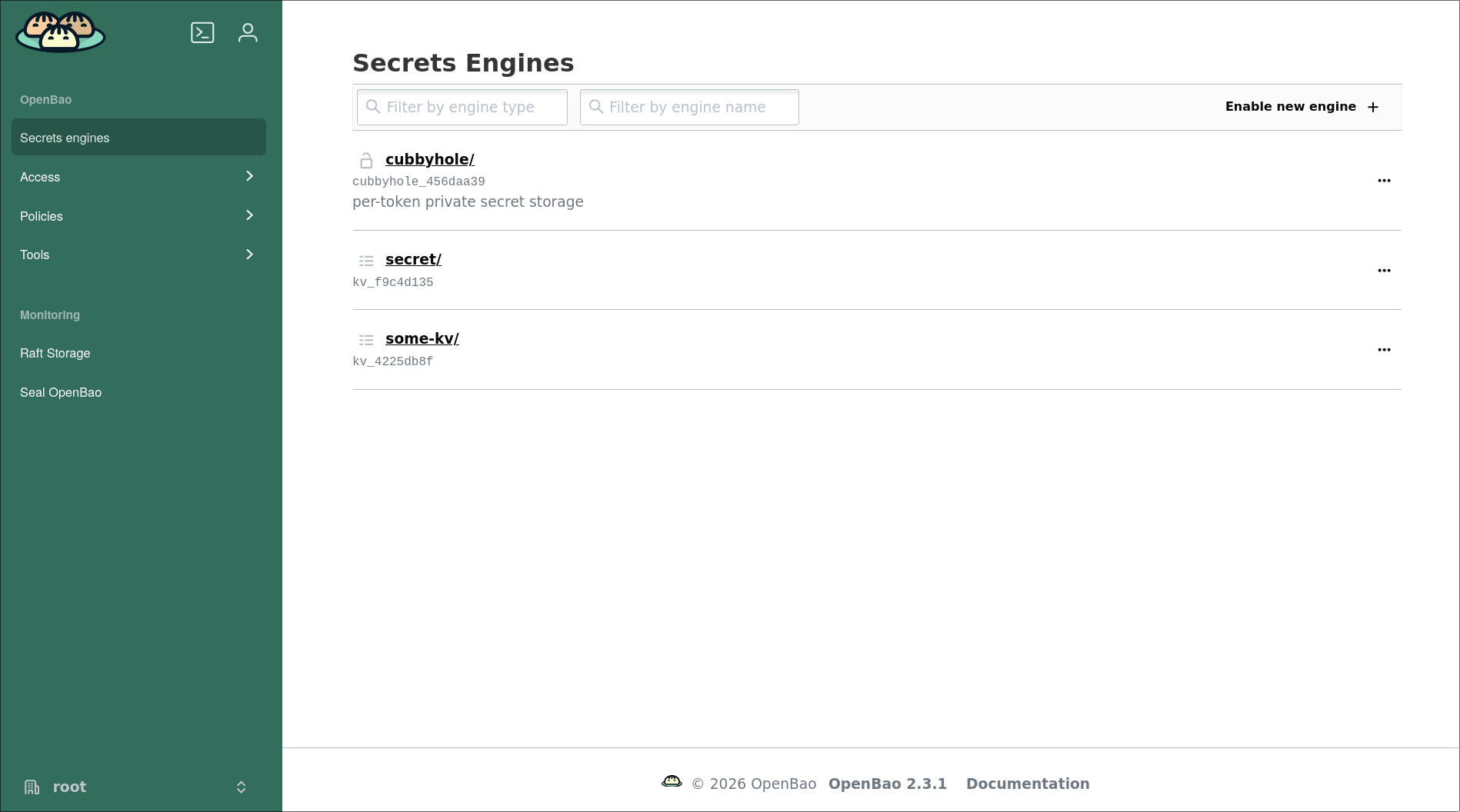
Now wire GitLab in as an identity provider and lay down the secret machinery the Vault scenarios will use. There are two auth methods because two kinds of client log in: CI jobs present a short-lived JWT/OIDC token from GitLab, while long-running workloads on prod (the Vault Agent and the SDK app) authenticate with AppRole. Log in with the root token, then:
# KV v2 for app secrets
bao secrets enable -path=secret kv-v2

# --- JWT auth: trust GitLab's OIDC tokens ---
bao auth enable jwt
bao write auth/jwt/config \
  jwks_url="https://gitlab.elnurbda.com/oauth/discovery/keys" \
  bound_issuer="https://gitlab.elnurbda.com" \
  jwks_ca_pem=@/openbao/config/gitlab.pem

# One policy + one role PER project, each scoped to that project's single path
# (shown for app-vault-env; repeat the same two commands for the other apps).
cat > app-vault-env.hcl <<'EOF'
path "secret/data/app-vault-env/prod" {
  capabilities = ["read"]
}
EOF
bao policy write app-vault-env app-vault-env.hcl

# project_path below is the project's GitLab namespace/path - e.g. root/app-vault-env
# for a project created by the root user. It is NOT the OS/SSH user (elnur), and it
# must match the token's claim exactly or the login 403s.
bao write auth/jwt/role/app-vault-env \
  role_type="jwt" \
  policies="app-vault-env" \
  token_ttl="15m" token_max_ttl="30m" \
  bound_audiences="openbao" \
  bound_claims_type="string" \
  bound_claims.project_path="root/app-vault-env" \
  user_claim="project_path"

# --- AppRole: for the prod workloads (the Vault Agent and the SDK app) ---
# Same idea: one role + scoped policy per app, and a bounded, response-wrapped secret-id.
bao auth enable approle
cat > app-vault-agent-env.hcl <<'EOF'
path "secret/data/app-vault-agent-env/prod" {
  capabilities = ["read"]
}
EOF
bao policy write app-vault-agent-env app-vault-agent-env.hcl

bao write auth/approle/role/app-vault-agent-env \
  token_policies="app-vault-agent-env" \
  token_ttl="1h" token_max_ttl="4h"

bao read auth/approle/role/app-vault-agent-env/role-id
# response-wrap the secret-id so the raw value never lands in logs or shell history
bao write -f -wrap-ttl=120s auth/approle/role/app-vault-agent-env/secret-id
That JWT block is the GitLab ↔ OpenBao trust, and it’s where the per-project least privilege lives:
- OpenBao trusts tokens GitLab signs: it fetches GitLab’s public keys from
jwks_urland accepts any whose issuer matchesbound_issuer(jwks_ca_pemis needed only because GitLab’s cert is self-signed). Nothing secret is shared. - Each role + policy is scoped to one project’s single path, not a blanket
secret/data/*. The role admits a login only if the token’sproject_pathexactly matchesbound_claims.project_path— the project’s full GitLab path (e.g.root/app-vault-env, not the OS user; a mismatch is the usual 403) — and the policy then grants read on that one path and nothing else.
Scenario 3 walks the actual login from the pipeline side. (Want one shared role instead of one per project? A templated policy keyed on the project_path claim gets you there.)
The UI is available at http://vault.elnurbda.com:8200/ui once you’ve unsealed.
Prod Setup
There’s almost nothing to do here - cloud-init already installed Docker. The runner deploys by SSHing in as elnur and running docker build / docker run, so make sure the public half of the deploy key (SSH_PRIVATE_KEY) is in ~/.ssh/authorized_keys on prod, and that prod’s /etc/hosts resolves vault.elnurbda.com for the scenarios that reach Vault. The apps listen on ports 80–84, one per scenario, all inside the VNet.
The Vault Agent used in scenario 4 also lives on this host - we’ll set it up in that section.
Scenarios
Five apps, one trivial job each: read an APP_USERNAME and APP_PASSWORD and render them on a dark little terminal page. They’re identical except for how the secret reaches them - which is the whole point. Each runs on its own port so you can compare them side by side. All five apps, their pipelines, and the setup scripts live in the companion repo, vault-gitlab-secret-patterns.
| # | Approach | Port | Where the secret lives |
|---|---|---|---|
| 1 | Traditional - .env file | 80 | GitLab CI variables → file on prod |
| 2 | Runtime injection | 81 | GitLab CI variables → container env |
| 3 | Vault, fetched in CI | 82 | OpenBao, read at deploy time |
| 4 | Vault Agent on prod | 83 | OpenBao, rendered to tmpfs |
| 5 | Vault SDK in the app | 84 | OpenBao, fetched live per request |
1. Traditional - No Vault
The baseline almost everyone starts with: secrets sit in GitLab’s CI/CD variables, and the pipeline writes them to a .env file on the server.
1.1. Code Base
The app just echoes two environment variables:
const express = require("express");
const app = express();
const PORT = 80;

const APP_USERNAME = process.env.APP_USERNAME || "(not set)";
const APP_PASSWORD = process.env.APP_PASSWORD || "(not set)";

app.get("/", (req, res) => {
  res.send(renderPage(APP_USERNAME, APP_PASSWORD)); // styled terminal page
});

app.listen(PORT, () => console.log(`Listening on :${PORT}`));
with a minimal Dockerfile:
FROM node:20-alpine
WORKDIR /app
COPY package*.json ./
RUN npm install --omit=dev
COPY server.js ./
CMD ["node", "server.js"]
1.2. Pipeline
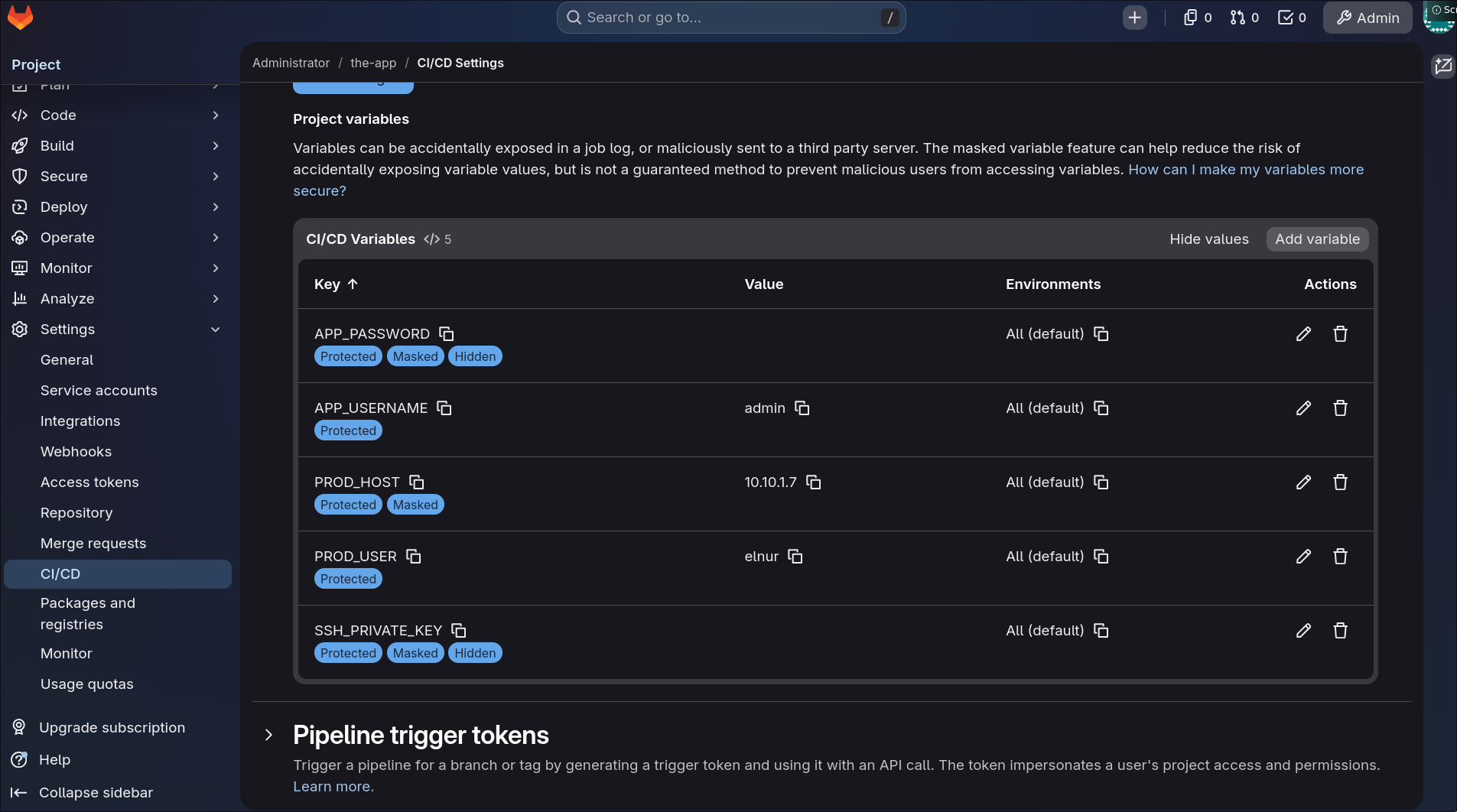
In Settings → CI/CD → Variables, store APP_USERNAME / APP_PASSWORD (masked) alongside the infra variables SSH_PRIVATE_KEY, PROD_HOST, PROD_USER, PROD_PORT.
The deploy job copies the source to prod, writes a .env from those variables, and runs the container:
deploy:
  stage: deploy
  before_script:
    - eval $(ssh-agent -s)
    - echo "$SSH_PRIVATE_KEY" | base64 -d | ssh-add -
    - mkdir -p ~/.ssh && chmod 700 ~/.ssh
    - ssh-keyscan -H $PROD_HOST >> ~/.ssh/known_hosts
  script:
    - scp -P ${PROD_PORT:-22} -r Dockerfile server.js package.json $PROD_USER@$PROD_HOST:~/env-debug
    - |
      ssh -p ${PROD_PORT:-22} $PROD_USER@$PROD_HOST bash << EOF
      set -e
      cd env-debug
      echo "APP_USERNAME=$APP_USERNAME" > .env
      echo "APP_PASSWORD=$APP_PASSWORD" >> .env
      docker build -t env-debug:latest .
      docker rm -f env-debug 2>/dev/null || true
      docker run -d --name env-debug --restart unless-stopped \
        -p 80:80 --env-file .env env-debug:latest
      EOF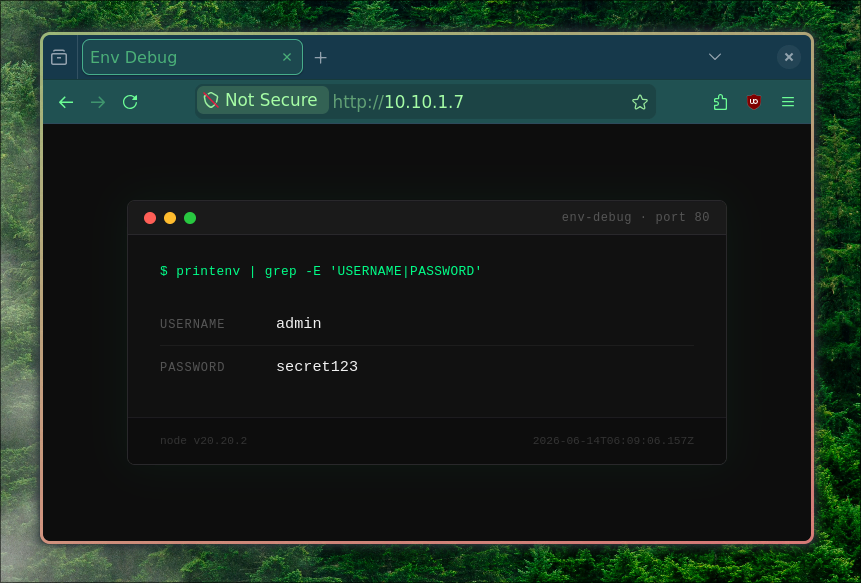
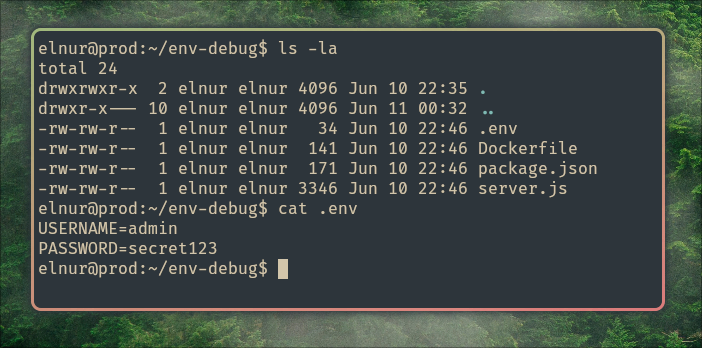
The problem. The secret is stored in GitLab, printed into the pipeline environment, and left sitting in a plaintext
.envon the prod disk. Anyone with Maintainer access to the project, or a shell on prod, can read it. Rotating means editing CI variables and redeploying.
2. A Bit Better - Inject at Runtime
Same secrets, same source - but skip the file. Pass the values straight into the container with -e, so nothing lands on disk:
script:
  - scp -P ${PROD_PORT:-22} -r Dockerfile server.js package.json $PROD_USER@$PROD_HOST:~/env-debug-2
  - |
    ssh -p ${PROD_PORT:-22} $PROD_USER@$PROD_HOST bash << EOF
    set -e
    cd env-debug-2
    docker build -t env-debug-2:latest .
    docker rm -f env-debug-2 2>/dev/null || true
    docker run -d --name env-debug-2 --restart unless-stopped \
      -p 81:81 \
      -e APP_USERNAME=$APP_USERNAME \
      -e APP_PASSWORD=$APP_PASSWORD \
      env-debug-2:latest
    EOF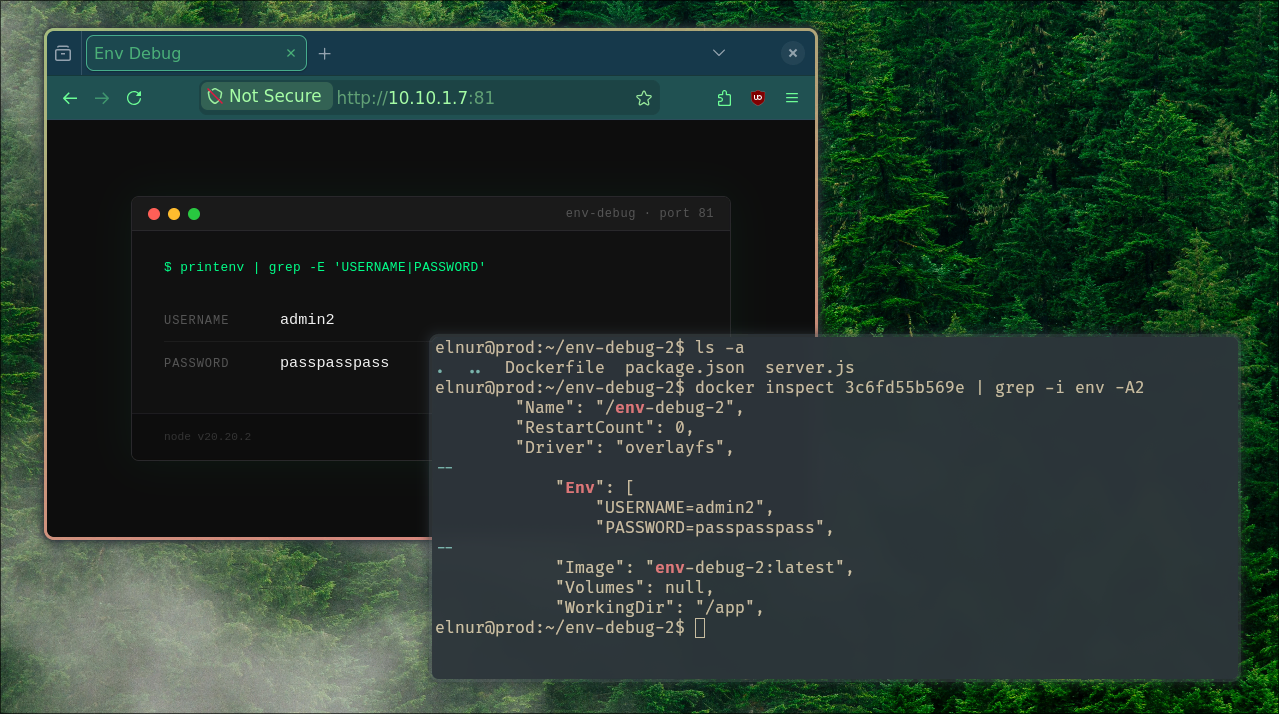
Marginally better, still not good. No
.envfile to forget about, but the secret is still in GitLab, still expanded into the pipeline, and still readable viadocker inspecton prod. We haven’t changed where the truth lives - only how it’s handed over.
3. Vault, Fetched in CI
Now the secret moves into OpenBao; GitLab only holds the means to ask for it. The job authenticates to Vault with its OIDC token (no stored credential at all), reads the secret, and injects it at docker run.
Seed the secret once:
bao kv put secret/app-vault-env/prod APP_USERNAME=admin3 APP_PASSWORD=heheheheheheheheheAdd VAULT_ADDR to the CI variables, and request an ID token in the job:
deploy:
  stage: deploy
  id_tokens:
    VAULT_ID_TOKEN:
      aud: "openbao" # must match bound_audiences on the JWT role (a distinct value, not the GitLab URL)
  before_script:
    - apk add --no-cache curl jq # the docker:24 runner image is minimal
    - |
      # Vault auth via JWT
      VAULT_TOKEN=$(curl -sf --data "{\"jwt\":\"${VAULT_ID_TOKEN}\",\"role\":\"app-vault-env\"}" \
        ${VAULT_ADDR}/v1/auth/jwt/login | jq -r '.auth.client_token')
      if [ -z "$VAULT_TOKEN" ] || [ "$VAULT_TOKEN" = "null" ]; then echo "Vault auth failed"; exit 1; fi
    - |
      # Read the secret and export the two fields
      SECRETS=$(curl -sf -H "X-Vault-Token: ${VAULT_TOKEN}" \
        ${VAULT_ADDR}/v1/secret/data/app-vault-env/prod)
      export APP_USERNAME=$(echo "$SECRETS" | jq -r '.data.data.APP_USERNAME')
      export APP_PASSWORD=$(echo "$SECRETS" | jq -r '.data.data.APP_PASSWORD')
    # ... ssh-agent setup as before
  script:
    # ... same as scenario 2, on :82 - docker run -e APP_USERNAME=$APP_USERNAME -e APP_PASSWORD=$APP_PASSWORD
Walking that handshake top to bottom:
- GitLab mints a short-lived JWT for this job (
VAULT_ID_TOKEN), withaudset to the value underid_tokensand identity claims likeproject_path. - The job POSTs it to
/v1/auth/jwt/loginwithrole=app-vault-env. - OpenBao verifies the signature against GitLab’s JWKS and checks
iss/aud/project_pathagainst the role — on a match it returns a 15-minuteclient_tokencarrying theapp-vault-envpolicy. - The job uses that token to read
secret/data/app-vault-env/prod— the only path that policy allows — then injects the values atdocker run.
The aud under id_tokens must equal the role’s bound_audiences, or step 3 fails — that’s the one value the setup and the pipeline have to agree on.
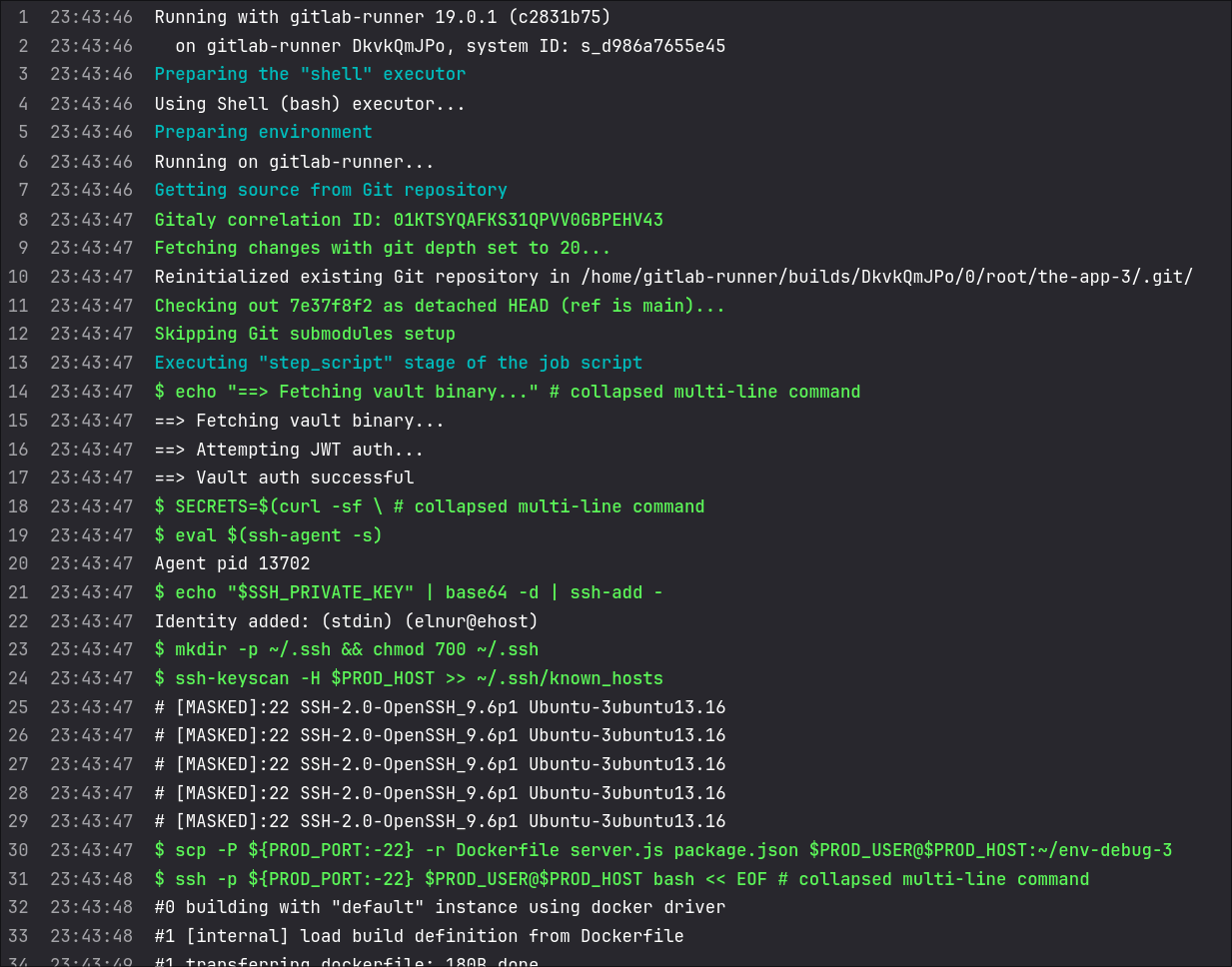
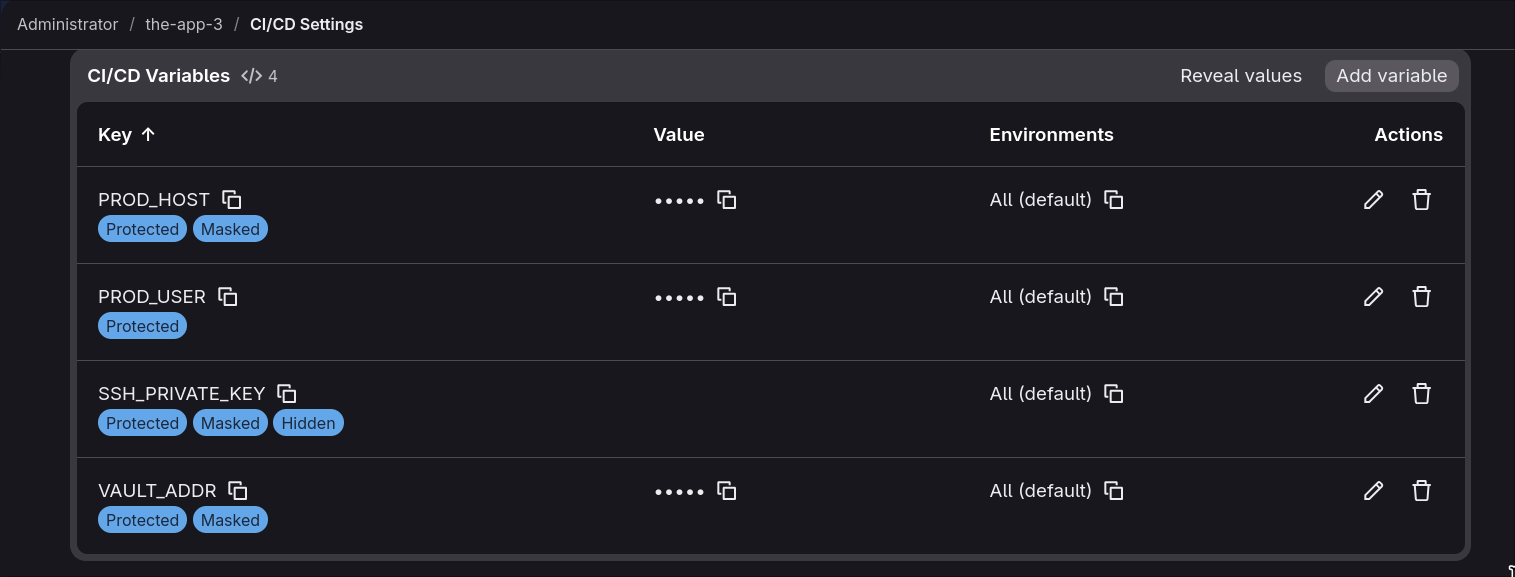
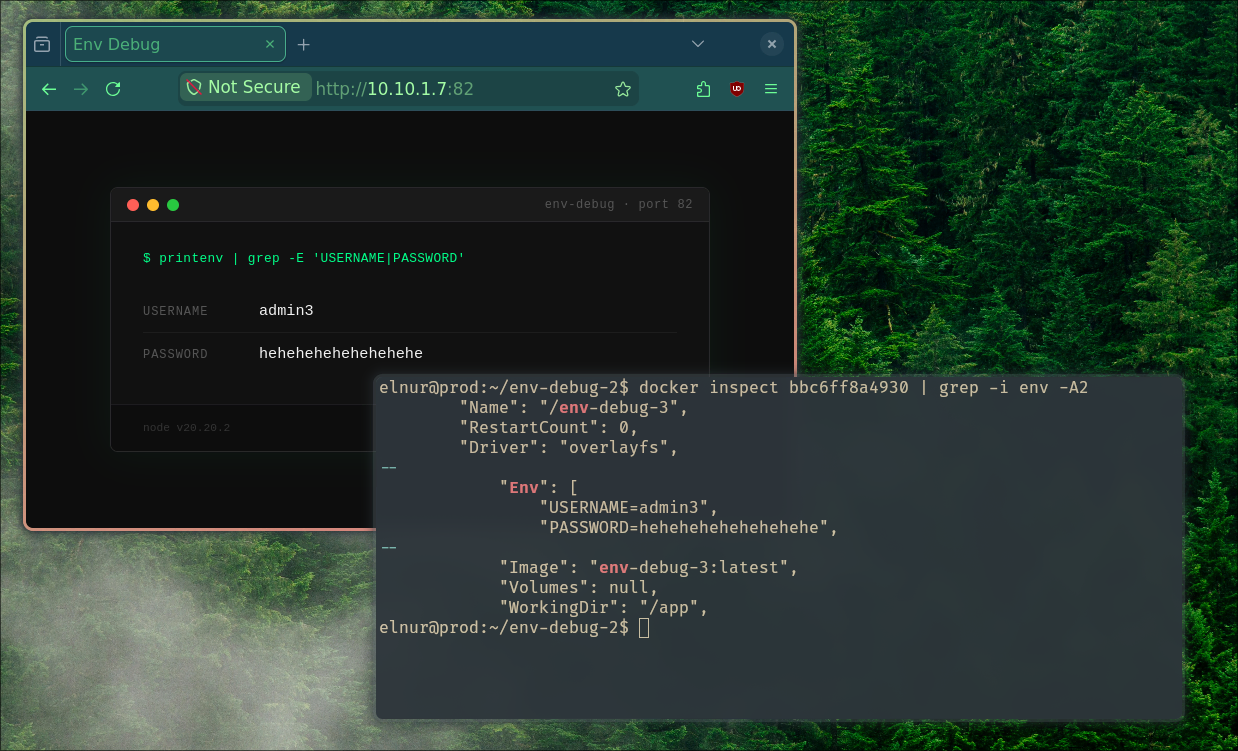
Better. The secret of record is in Vault, guarded by a per-project read-only policy and short-lived tokens. GitLab stores no Vault credential - the job proves its identity with a token valid only for that run, and can read only its own project’s path. The remaining exposure is the moment the value passes through the CI job.
4. Vault Agent on Prod
What if CI never touches the secret at all? A Vault Agent runs on prod as a systemd service: it logs in with AppRole, fetches the secret, renders it to a file on tmpfs, and keeps its token renewed. The pipeline just points --env-file at that file.
Install the agent (the OpenBao binary), give it credentials, and write a config:
# /etc/vault-agent/config.hcl
vault { address = "http://vault.elnurbda.com:8200" }

auto_auth {
  method "approle" {
    config = {
      role_id_file_path                   = "/etc/vault-agent/role-id"
      secret_id_file_path                 = "/etc/vault-agent/secret-id"
      remove_secret_id_file_after_reading = true   # default: read once, then delete it
    }
  }
  sink "file" { config = { path = "/run/vault-agent/token" } }
}

template {
  contents = <<EOT
{{ with secret "secret/data/app-vault-agent-env/prod" }}
APP_USERNAME={{ .Data.data.APP_USERNAME }}
APP_PASSWORD={{ .Data.data.APP_PASSWORD }}
{{ end }}
EOT
  destination = "/run/vault-agent/app.env"
  perms       = 0640                                # not world-readable
}
/run/vault-agent is a tmpfs mount (tmpfs /run/vault-agent tmpfs rw,noexec,nosuid,size=10m 0 0 in /etc/fstab), so the rendered secret only ever lives in RAM. It’s written 0640, not 0644: tmpfs keeps it off disk, but 0644 would still let any local user cat it. 0640 limits it to the agent’s user and group — so run the agent as a dedicated vault-agent user, add the deploy user elnur to that group, and docker run --env-file can still read the file.
A word on the agent’s own credential: the role-id and secret-id in /etc/vault-agent/ are what it authenticates with. With remove_secret_id_file_after_reading (on by default) the agent reads the secret-id once and deletes it, so after first boot only the low-sensitivity role-id is left on disk — exactly what an ls /etc/vault-agent/ shows. So “no credential at rest” isn’t quite true here, but the sensitive half is gone. Run it under systemd:
# /etc/systemd/system/vault-agent.service
[Unit]
Description=Vault Agent
After=network-online.target
Wants=network-online.target

[Service]
ExecStart=/usr/bin/bao agent -config=/etc/vault-agent/config.hcl
Restart=on-failure
RestartSec=5
# dedicated user, not root - see the caveat under "rotated secrets"
User=vault-agent

[Install]
WantedBy=multi-user.target
systemctl daemon-reload
systemctl enable --now vault-agent
systemctl status vault-agentTwo operational gotchas with this dedicated-user, tmpfs setup:
- tmpfs ownership. A bare fstab mount comes up
root:root, so thevault-agentuser can’t write into/run/vault-agent. Grant it with atmpfiles.drule —d /run/vault-agent 0750 vault-agent vault-agentin/etc/tmpfiles.d/vault-agent.conf— oruid=/gid=mount options, otherwise the agent fails to render on boot. - Reboot re-auth. The token sink and the rendered secret both live on tmpfs, and the
secret-idwas deleted after first read — so a reboot leaves the agent with no way to log back in. Re-drop a freshsecret-idfrom provisioning on boot, or setremove_secret_id_file_after_reading = falseand accept thesecret-idstaying on disk.
The pipeline no longer knows anything about secrets:
script:
  - scp ... $PROD_USER@$PROD_HOST:~/env-debug-4
  - |
    ssh ... bash << EOF
    cd env-debug-4
    docker build -t env-debug-4:latest .
    docker rm -f env-debug-4 2>/dev/null || true
    docker run -d --name env-debug-4 --restart unless-stopped \
      -p 83:83 --env-file /run/vault-agent/app.env env-debug-4:latest
    EOF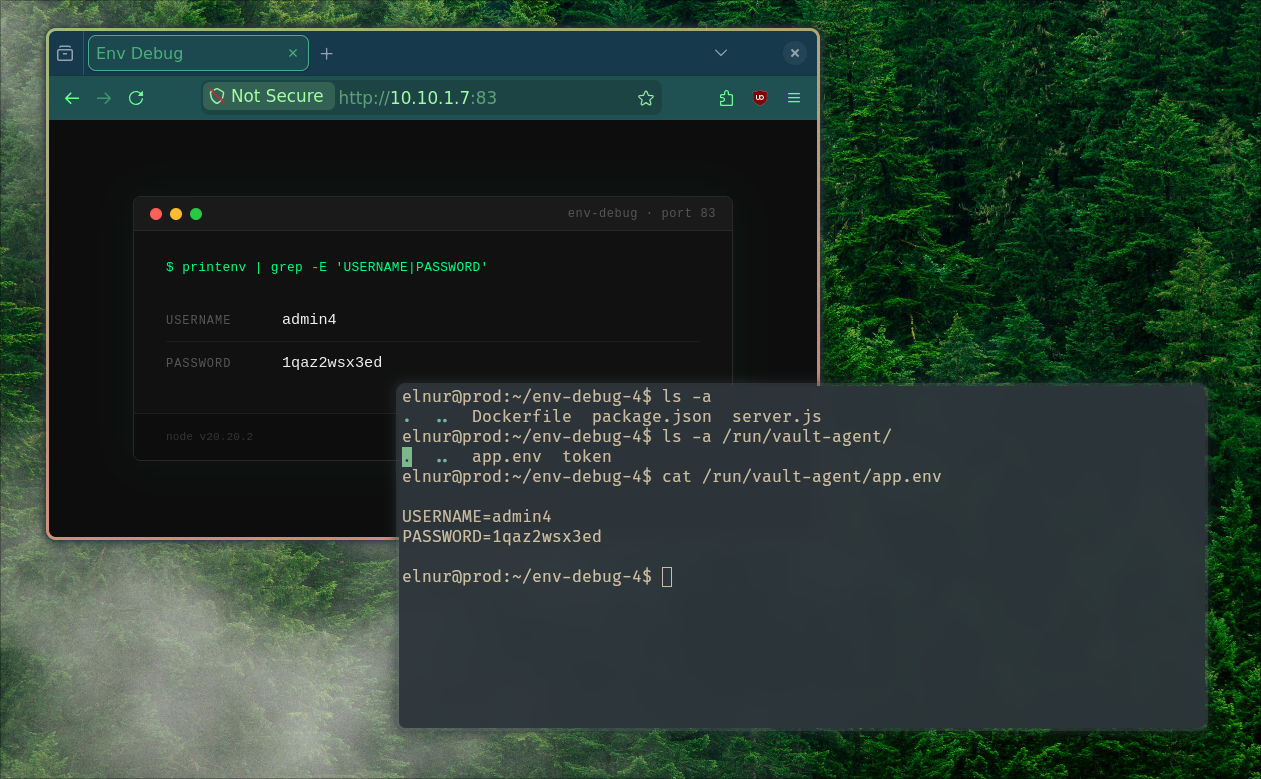
Picking up rotated secrets. There’s a catch. When the secret rotates in Vault, the agent re-renders /run/vault-agent/app.env — but the running container already read its environment at docker run and never looks at the file again. Environment variables are a one-time snapshot, so the app keeps serving the old value until its process restarts.
The fix is to let the agent restart the container on every render. The template stanza accepts a command that runs after each successful render:
template {
  contents    = "..."   # as above
  destination = "/run/vault-agent/app.env"
  perms       = 0640
  command     = "docker restart env-debug-4"   # reload the container with the new env
}
For that docker restart to work, the agent’s vault-agent user has to be in the docker group so it can reach the Docker socket. Now a rotation flows all the way through: secret changes in Vault → agent re-renders the file → container restarts → the app serves the new value, with no pipeline run and nobody in the loop. The cost is a brief blip while the container restarts; if the app can reload on a signal instead, swap in something like docker kill -s HUP env-debug-4.
There’s a real trade-off hiding in that docker group membership, though. Access to the Docker socket is effectively root on the host — anyone who can run containers can mount the host filesystem and own the box. So a dedicated user buys you less than it looks: a leaked AppRole credential here still means full host compromise, not just one leaked secret. The dedicated user narrows who on the box can prod the agent; it doesn’t shrink the socket’s blast radius. If you can’t accept that, drop the command hook and restart the container from a tiny separate unit (a systemd path watcher on app.env) that holds the socket access instead.
Stronger still. GitLab holds no app secret and no Vault credential - only SSH access. On prod the agent’s
role-iddoes sit on disk, but the sensitivesecret-idis read once and removed, and the app secret itself never leaves RAM. It’s fetched on prod, kept in memory, and auto-renewed — and with the restart hook above, rotations reach the app on their own.
5. The App Talks to Vault Directly
The final step removes the middleman entirely: the application authenticates to Vault itself and fetches secrets live on every request. No .env, no agent, no build-time injection - only the AppRole credentials, handed to the container at docker run.
The app gains a few lines:
let cache = { secret: null, expires: 0 };

async function vaultLogin() {
  const res = await fetch(`${VAULT_ADDR}/v1/auth/approle/login`, {
    method: "POST",
    headers: { "Content-Type": "application/json" },
    body: JSON.stringify({
      role_id: VAULT_ROLE_ID,
      secret_id: VAULT_SECRET_ID,
    }),
  });
  return (await res.json()).auth; // { client_token, lease_duration, ... }
}

async function getSecrets() {
  // serve from cache until the token's lease is nearly up — don't log in per request
  if (cache.secret && Date.now() < cache.expires) return cache.secret;

  const auth = await vaultLogin();
  const res = await fetch(`${VAULT_ADDR}/v1/${VAULT_SECRET_PATH}`, {
    headers: { "X-Vault-Token": auth.client_token },
  });
  cache.secret = (await res.json()).data.data; // KV v2 nesting
  cache.expires = Date.now() + (auth.lease_duration - 60) * 1000; // refresh ~1 min early
  return cache.secret;
}

app.get("/", async (req, res) => {
  const { APP_USERNAME, APP_PASSWORD } = await getSecrets();
  res.send(renderPage(APP_USERNAME, APP_PASSWORD));
});
CI injects only the credentials and the address:
script:
  - scp ... $PROD_USER@$PROD_HOST:~/app-vault-sdk-env
  - |
    ssh ... bash << EOF
    cd app-vault-sdk-env
    docker build -t app-vault-sdk-env:latest .
    docker rm -f app-vault-sdk-env 2>/dev/null || true
    docker run -d --name app-vault-sdk-env --restart unless-stopped \
      -p 84:84 \
      --add-host vault.elnurbda.com:10.10.1.8 \
      -e VAULT_ADDR=http://vault.elnurbda.com:8200 \
      -e VAULT_ROLE_ID=${VAULT_APPROLE_ROLE_ID} \
      -e VAULT_SECRET_ID=${VAULT_APPROLE_SECRET_ID} \
      -e VAULT_SECRET_PATH=secret/data/app-vault-sdk-env/prod \
      app-vault-sdk-env:latest
    EOF
Two things to keep honest here:
- The
secret_idis now the weak point. It’s injected with-e, sodocker inspect app-vault-sdk-envshows it in plaintext — that’s the one credential still at rest on prod. Keep it bounded (secret_id_ttl+secret_id_num_uses) and rotate it from CI, or hand the container a response-wrapped secret-id it unwraps once at boot, rather than the raw value. - The heredoc is unquoted (
<< EOF, not<< 'EOF') so the runner expands${VAULT_APPROLE_SECRET_ID}before sending it over SSH, and--add-hostis needed because containers don’t inherit the host’s/etc/hosts.
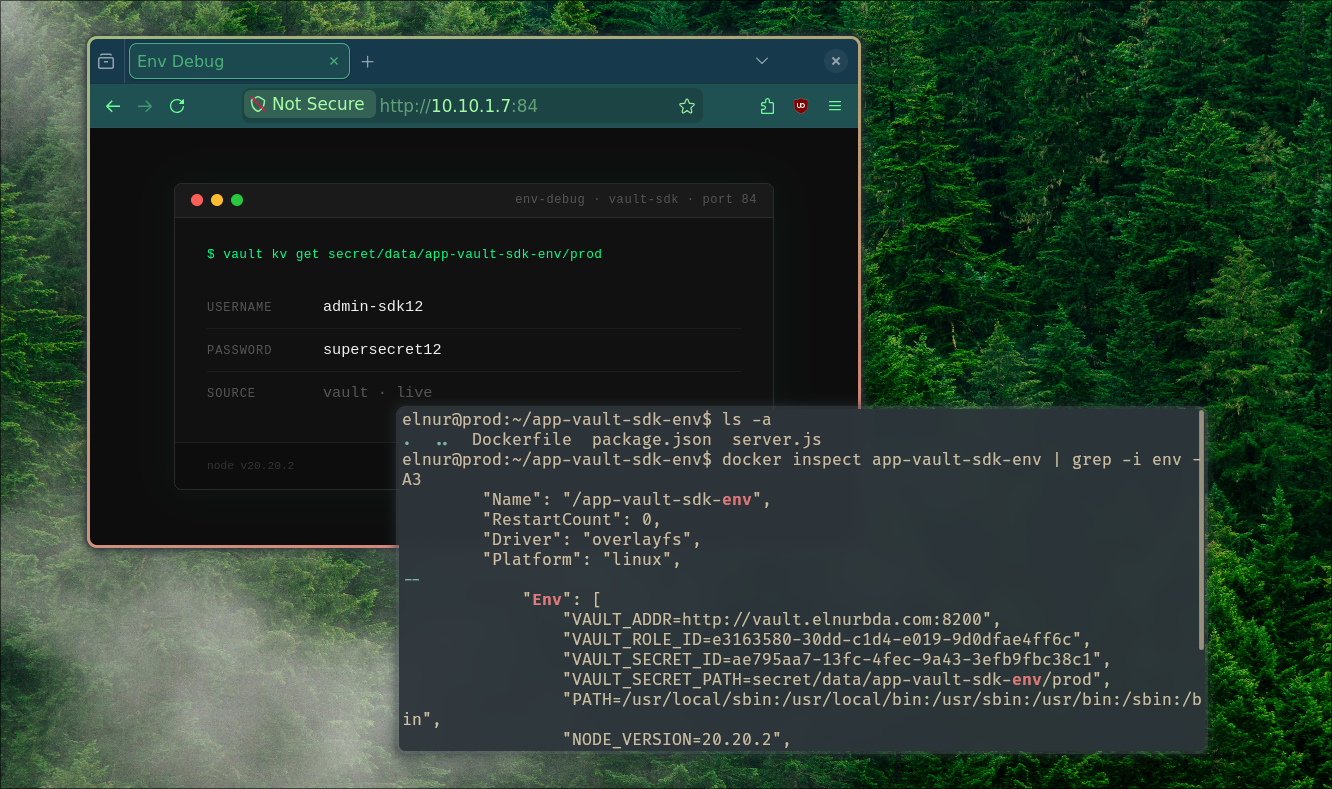
The strongest of the five — for the app secret. The username/password is never written to disk, baked into the image, or rendered to a file; it’s read on demand and rotates the instant it changes in Vault. The catch is the Vault credential: the
secret_idrides in with-e, so it lives indocker inspectat rest — the exposure moved from the app secret to the credential that fetches it. And with the cache above it’s one login per token lease plus an occasional read, not a round-trip per request.
Conclusion
Walking the five scenarios is really walking one secret backwards, out of the places it shouldn’t be:
| # | In repo / CI? | App secret at rest on prod | Vault credential (where it lives) | Rotation |
|---|---|---|---|---|
1. .env file | ✅ CI vars | ✅ plaintext .env | — | redeploy |
2. Runtime -e | ✅ CI vars | in docker inspect | — | redeploy |
| 3. Vault in CI | ❌ | only during the job | none — JWT, nothing stored | edit Vault |
| 4. Vault Agent | ❌ | RAM only (tmpfs) | role-id on disk; secret-id read-then-removed | automatic |
| 5. Vault SDK | ❌ | never | secret-id in docker inspect | instant |
There’s no single “correct” row - it’s a trade-off between how tightly you handle secrets and how much complexity you take on. Scenario 3 is a pragmatic sweet spot for most pipelines; scenario 4 shines when CI shouldn’t be trusted with secrets at all; scenario 5 fits apps that need live rotation and can tolerate a hard dependency on Vault. The one row to retire is the first.
References
- vault-gitlab-secret-patterns — companion repo: the five apps, pipelines, and setup scripts from this post
- OpenBao — the secrets manager used throughout
- OpenBao — JWT/OIDC auth method — trusting GitLab as an identity provider (scenario 3)
- OpenBao — AppRole auth method —
role_id+secret_idfor workloads (scenarios 3–5) - OpenBao Agent — auto-auth and secret templating on prod (scenario 4)
- openbao-docker-compose — the Compose setup this OpenBao deployment is based on
- OpenBao releases — the
baobinary for the prod host - Install GitLab with Docker
- Install GitLab Runner
- GitLab CI/CD — secrets management and the
id_tokenskeyword - Install Docker Engine on Ubuntu
- sshuttle — the “poor man’s VPN” used to reach the private subnet